
A lot of business owners know they need help managing email, but the inbox is rarely just a place where messages land. It is where client history, priorities, follow-ups, internal decisions, deadlines, and tone all collide in one place.
That is why inbox support can feel frustrating at first.
A new assistant or support person does not automatically know who matters most, what needs an immediate response, what can wait, what can be drafted, or what should never be assumed. In the beginning, questions are normal.
The real problem is not that support asks questions.
The real problem is when there is no process that helps those questions decrease over time.
Why Inbox Chaos Is Bigger Than an Email Problem
Inbox chaos does not just waste time. It affects focus, increases mental load, and can make it harder to work through priorities clearly.
That is why inbox support matters.
Not because every founder or executive should be removed from communication completely, but because the inbox should not consume the kind of attention that needs to go toward leadership, client work, decision-making, and growth.
When the inbox becomes the place where everything piles up at once, it is harder to think clearly, prioritize well, and move through the day with intention. Research has shown that improving email strategies can help increase productivity and decrease stress in the workplace. Read the study here.
Why Inbox Delegation Often Fails
Inbox delegation often starts too fast and too vaguely.
A business owner realizes the inbox is overwhelming, gives someone access, explains a few things quickly, and hopes that person will figure it out. But good support does not come from access alone. It comes from context.
The better approach is to build inbox support in layers.
That means the goal is not to hand over everything immediately. The goal is to create a system that helps support become more accurate, more confident, and more useful over time.
What Good Inbox Support Actually Looks Like
If your inbox touches active clients, ongoing projects, deadlines, service requests, vendor communication, and internal follow-ups, then your inbox is part of your operations.
And operations need process, especially when they are connected to the kind of support and backend structure that keeps a business moving.
Good inbox support usually starts with:
- organizing emails by type, urgency, or action needed
- flagging messages that need your eyes
- separating routine communication from sensitive communication
- drafting replies for straightforward emails
- tracking follow-ups and unanswered threads
- reviewing unclear items on a regular schedule
This creates structure before autonomy.
That matters because support works better when there is a pattern to follow. The more clearly the business defines what support should look for, sort, flag, and draft, the easier it becomes for that support to work well.
What to Delegate First
If you are building inbox support, start with lower-risk tasks that still save real time.
Good starting points include:
- sorting and labeling incoming messages
- flagging urgent items
- drafting replies for routine emails
- tracking follow-ups
- filing communication into the correct folders or systems
- keeping a running list of unclear situations and repeated questions
These tasks reduce mental load without forcing support into high-stakes decisions too early.
A lot of businesses make the mistake of either delegating nothing or trying to delegate everything all at once.
Usually, the smarter move is somewhere in the middle.
What Not to Delegate Too Early
At least in the beginning, some communication should probably stay with the business owner.
That may include:
- sensitive client concerns
- pricing or negotiation conversations
- conflict-heavy communication
- strategic approvals
- anything that depends on deeper business judgment
This is not poor delegation. It is smart delegation.
The goal is not to remove yourself from your inbox overnight. The goal is to create a support system that becomes more useful over time.
There Is More Than One Way to Structure Inbox Support
Inbox support does not have to look the same for every business.
Some businesses do better with a morning clearing block, where support comes in early, sorts the inbox, flags what matters most, and gives the business owner a cleaner starting point.
Others benefit from a midday review block, where routine messages are cleared and decision-heavy items are grouped together.
Some prefer end-of-day cleanup, where support closes loops, tracks unanswered threads, and prepares the inbox for the next day.
Others need a weekly review system, where support handles daily trafficking and holds unclear items for one focused review session each week.
Another strong option is draft-first support, where support drafts replies first and the owner reviews them until patterns are clear enough for more independence.
The point is not that there is one perfect method.
The point is that inbox support works better when there is a clear strategy behind it. Research has also found that checking email less frequently can reduce stress, which supports the value of a more intentional inbox rhythm. Read the study here.
A Simple Framework for Making Inbox Support Stronger
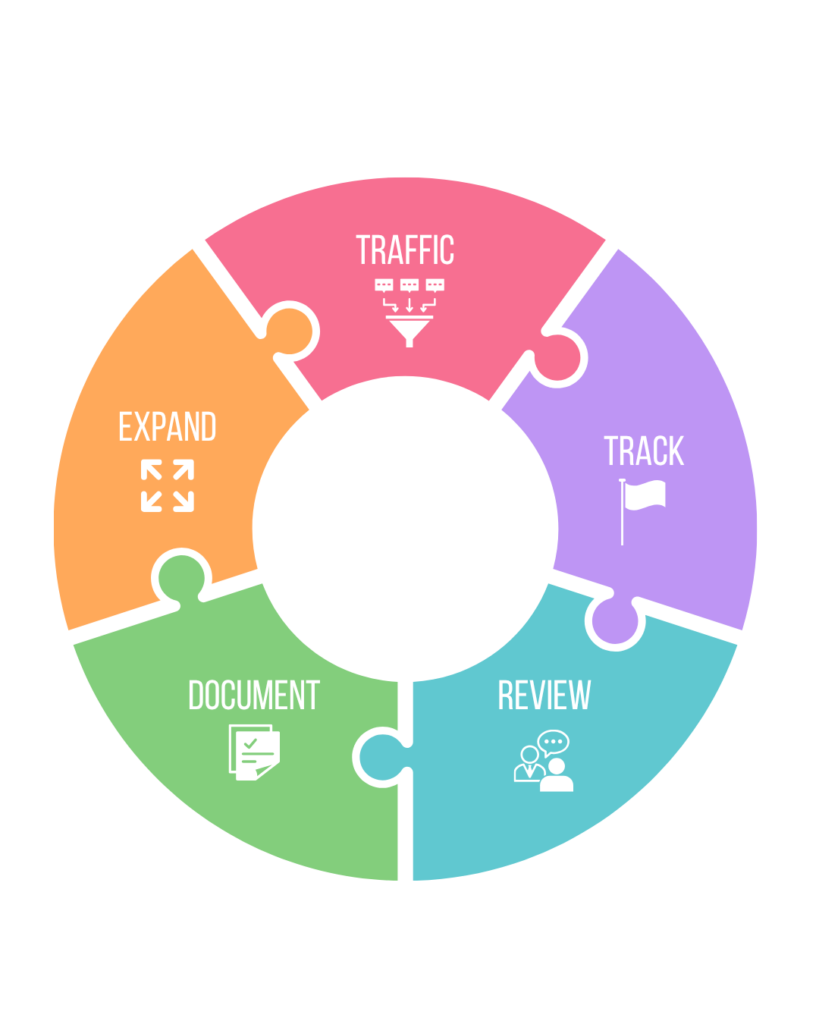
A practical inbox support framework looks like this:
1. Traffic
Sort what comes in and identify what is routine, urgent, sensitive, or unclear.
2. Track
Keep a shared note, spreadsheet, or simple tracker for repeated questions and edge cases.
3. Review
Instead of answering scattered questions all day, review them in one consistent block.
4. Document
Turn repeated decisions into guidance so support has something to follow.
5. Expand
As context grows, increase ownership gradually.
Why This Helps Beyond the Inbox
Good inbox support does more than clear emails.
It protects attention. It reduces decision fatigue. It helps business owners stop carrying so much context in their heads. It makes communication easier to revisit. And it creates more room for better thinking, better service, and stronger operations.
That is the bigger value.
A lot of people think inbox support is just admin help.
But when it is built well, inbox support is an operational advantage.
Final Takeaway
If your inbox still depends on you reading everything, deciding everything, and holding all the context in real time, the issue may not be that you need more help.
It may be that the help needs a better system.
Good inbox support is not just someone entering the inbox.
It is someone being set up to make the inbox easier, clearer, and more manageable over time.
And that starts with process.
If you need help making the visible and behind-the-scenes parts of your business work better together, contact us here.